It's quite easy creating a simple information system with Firebird and C# express 2008.
You will need the following to do this:
1. Firebird RDBMS (The latest release as of this post is 2.1.3)
2. EMS IBManager Lite (The freeware version. There are other Free Firebird IDE that you can use but for me, this one is the most user-friendly)
3. Microsoft C# Express 2008 (This can be downloaded at the Microsoft Website)
4. Firebird .Net Provider
Creating the database:
1. Create a database in EMS IBManager Lite
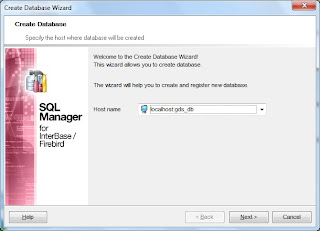
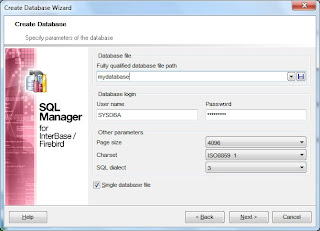
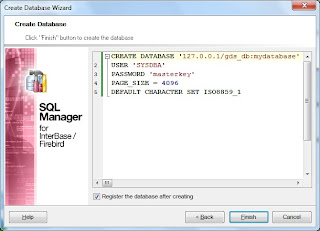
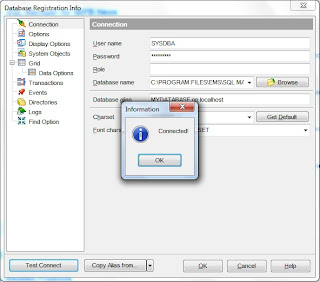
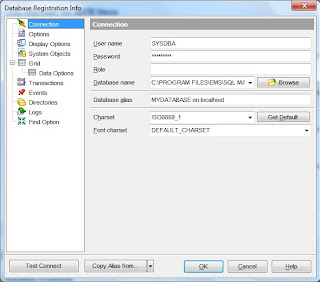
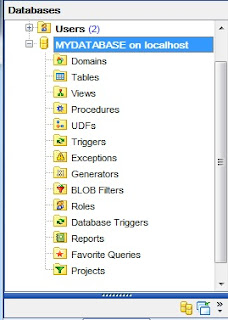
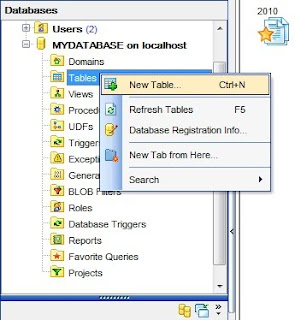
We'll create a table for recording our Gold IRA Deposits. An IRA is a retirement account that can be used by an employed person. It can be in various form. One of which is an IRA Gold in which instead of money being deposited, you deposit gold. It can be a gold coin. Preferably, it would be good to deposit high value items such as a 401k Gold.
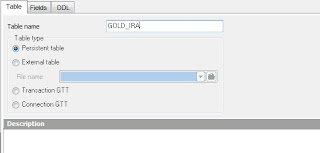
Use the following for the fields.

Be sure to edit the ID field to have an autoincrement value.

Let's add a record with the following values:
ACCOUNT_ID: 1111-1111-1111
DATE_DEPOSITED: 8/31/2010
DESCRIPTION: Gold 401K
*******************************************************
Now for our C# application, open C# Express 2008 and create a new Windows Forms Application.
Drag a DataGridView to the form.
Add a reference for the project to c:\Program Files\FirebirdClient\FirebirdSql.Data.FirebirdClient.dll
Double-click the form and add using FirebirdSql.Data.FirebirdClient;
Declare an FbConnection before the constructor. FbConnection cn;
On the constructor, add the following code right after InitializeComponent();
cn = new FbConnection(@"User=SYSDBA;Password=masterkey;Database=C:\PROGRAM FILES\EMS\SQL MANAGER LITE FOR INTERBASE & FIREBIRD\MYDATABASE.gdb;DataSource=localhost; Port=3050;Dialect=3; Charset=NONE;Role=;Connection lifetime=15;Pooling=true; MinPoolSize=0;MaxPoolSize=50;Packet Size=8192;ServerType=0;");
cn.Open();
the C:\PROGRAM FILES\EMS\SQL MANAGER LITE FOR INTERBASE & FIREBIRD\MYDATABASE.gdb should be replaced with your corresponding database.
On the Form_Load method, add the following:
FbDataAdapter da = new FbDataAdapter("select * from GOLD_IRA", cn);
DataTable dt = new DataTable();
da.Fill(dt);
dataGridView1.DataSource = dt;
Press F5 and you should see the following:

Your code should look like this:
using System;
using System.Collections.Generic;
using System.ComponentModel;
using System.Data;
using System.Drawing;
using System.Linq;
using System.Text;
using System.Windows.Forms;
using FirebirdSql.Data.FirebirdClient;
namespace WindowsFormsApplication1
{
public partial class Form1 : Form
{
FbConnection cn;
public Form1()
{
InitializeComponent();
cn = new FbConnection(@"User=SYSDBA;Password=masterkey;Database=C:\PROGRAM FILES\EMS\SQL MANAGER LITE FOR INTERBASE & FIREBIRD\MYDATABASE.gdb;DataSource=localhost; Port=3050;Dialect=3; Charset=NONE;Role=;Connection lifetime=15;Pooling=true; MinPoolSize=0;MaxPoolSize=50;Packet Size=8192;ServerType=0;");
cn.Open();
}
private void Form1_Load(object sender, EventArgs e)
{
FbDataAdapter da = new FbDataAdapter("select * from GOLD_IRA", cn);
DataTable dt = new DataTable();
da.Fill(dt);
dataGridView1.DataSource = dt;
}
}
}
You will need the following to do this:
1. Firebird RDBMS (The latest release as of this post is 2.1.3)
2. EMS IBManager Lite (The freeware version. There are other Free Firebird IDE that you can use but for me, this one is the most user-friendly)
3. Microsoft C# Express 2008 (This can be downloaded at the Microsoft Website)
4. Firebird .Net Provider
Creating the database:
1. Create a database in EMS IBManager Lite


We'll create a table for recording our Gold IRA Deposits. An IRA is a retirement account that can be used by an employed person. It can be in various form. One of which is an IRA Gold in which instead of money being deposited, you deposit gold. It can be a gold coin. Preferably, it would be good to deposit high value items such as a 401k Gold.

Use the following for the fields.

Be sure to edit the ID field to have an autoincrement value.

Let's add a record with the following values:
ACCOUNT_ID: 1111-1111-1111
DATE_DEPOSITED: 8/31/2010
DESCRIPTION: Gold 401K
*******************************************************
Now for our C# application, open C# Express 2008 and create a new Windows Forms Application.
Drag a DataGridView to the form.
Add a reference for the project to c:\Program Files\FirebirdClient\FirebirdSql.Data.FirebirdClient.dll
Double-click the form and add using FirebirdSql.Data.FirebirdClient;
Declare an FbConnection before the constructor. FbConnection cn;
On the constructor, add the following code right after InitializeComponent();
cn = new FbConnection(@"User=SYSDBA;Password=masterkey;Database=C:\PROGRAM FILES\EMS\SQL MANAGER LITE FOR INTERBASE & FIREBIRD\MYDATABASE.gdb;DataSource=localhost; Port=3050;Dialect=3; Charset=NONE;Role=;Connection lifetime=15;Pooling=true; MinPoolSize=0;MaxPoolSize=50;Packet Size=8192;ServerType=0;");
cn.Open();
the C:\PROGRAM FILES\EMS\SQL MANAGER LITE FOR INTERBASE & FIREBIRD\MYDATABASE.gdb should be replaced with your corresponding database.
On the Form_Load method, add the following:
FbDataAdapter da = new FbDataAdapter("select * from GOLD_IRA", cn);
DataTable dt = new DataTable();
da.Fill(dt);
dataGridView1.DataSource = dt;
Press F5 and you should see the following:

Your code should look like this:
using System;
using System.Collections.Generic;
using System.ComponentModel;
using System.Data;
using System.Drawing;
using System.Linq;
using System.Text;
using System.Windows.Forms;
using FirebirdSql.Data.FirebirdClient;
namespace WindowsFormsApplication1
{
public partial class Form1 : Form
{
FbConnection cn;
public Form1()
{
InitializeComponent();
cn = new FbConnection(@"User=SYSDBA;Password=masterkey;Database=C:\PROGRAM FILES\EMS\SQL MANAGER LITE FOR INTERBASE & FIREBIRD\MYDATABASE.gdb;DataSource=localhost; Port=3050;Dialect=3; Charset=NONE;Role=;Connection lifetime=15;Pooling=true; MinPoolSize=0;MaxPoolSize=50;Packet Size=8192;ServerType=0;");
cn.Open();
}
private void Form1_Load(object sender, EventArgs e)
{
FbDataAdapter da = new FbDataAdapter("select * from GOLD_IRA", cn);
DataTable dt = new DataTable();
da.Fill(dt);
dataGridView1.DataSource = dt;
}
}
}
Comments